K2Neet
Anyone can send a question to an AI. Making the answer worth reading is the frontend's job.
A college friend wanted to build a mobile app for NEET students,1 and asked me to take the frontend. We built it together, and it became K2Neet: pick a subject, ask for notes, a quick answer or a summary, and the AI does the rest.
I handled the entire frontend in Flutter, from designing the UI from scratch to GetX state management, cache optimisation and the Play Store release.
The work also took me away from my editor. I travelled to Surat to sign the legal agreements, and that's where I learned how the legal side of a project works.
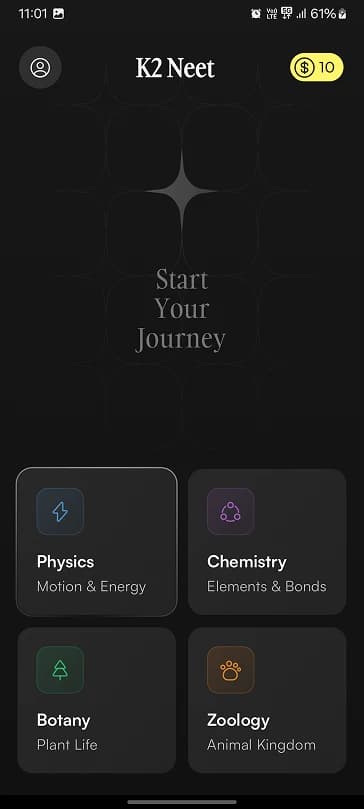
A home screen that feels alive
The home screen is the first thing a student sees, so that's where the small details start.
A star breathes above the words Start Your Journey, while a shimmer crosses it from bottom left to top right. Each subject has its own colour and icon. And a thin band of light runs around the border of each card in turn, so the screen never feels frozen, even when nobody is touching it.
Your
Journey
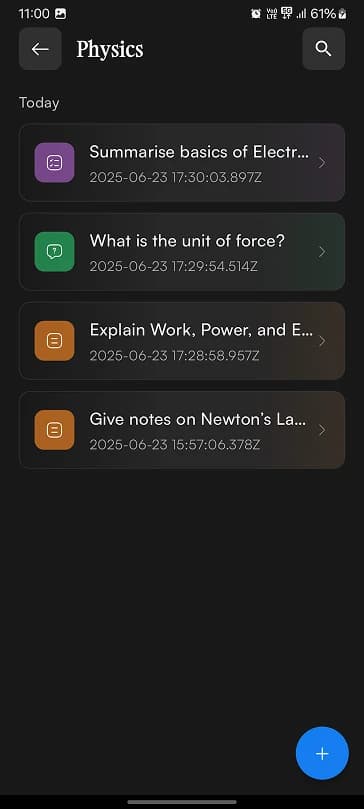
A list you can read at a glance
Everything a student asks is saved under its subject, and a long history can easily turn into a wall of text. So each row carries a soft gradient in the colour of its type: purple for summaries, green for Q&A and orange for notes.
You can tell them apart before you read a word.
One button starts something new. Tap it, and the screen blurs, the three options rise one after another, and the plus turns into a close button.
Ask out loud
Long questions are slow to type on a phone, so students can speak instead, and the app turns their voice into text.
For anyone unsure what to ask, ready-made questions from the subject sit just below the field.
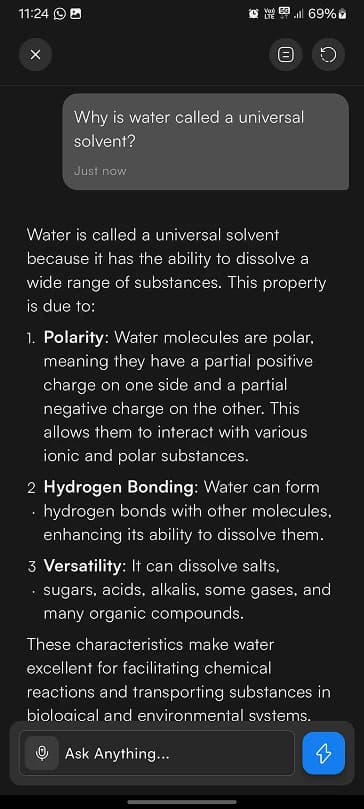
An answer worth reading
A raw AI reply arrives as one long string, full of symbols. On a phone, that's hard to study from.
So the app never shows the raw text. It parses every reply, handling bold, italics, code snippets and bullet points. The question sits in its own bubble, key terms stand out, points get real numbers, and the text has room to breathe.
And when an answer is worth keeping, it can be exported as a PDF.
Two typefaces, one mood
The typography does quiet work too. Instrument Serif is saved for headings, like the app's name and Start Your Journey. It has just one weight, which keeps those moments rare.
Everything you read sits in Satoshi, a clean sans that stays clear on a dark screen. Its weights do the ranking: bold for key terms, medium for titles, and lighter weights for the small print.
Colour, icons and motion
The rest of the system follows the same idea: nothing is only decoration. Subjects get a tinted icon, the three modes get a solid one, and actions stay as plain lines, so an icon tells you what kind of thing it is before you tap it.
Here's all of it on one sheet.
The Flutter underneath
Everything so far is what a student sees. Underneath, the app is built in Flutter, and four pieces of engineering keep it feeling as quick as it looks.
State with GetX
A Flutter screen is a tree of widgets. The simplest way to update one is setState, which rebuilds that widget and everything under it. On a home screen full of small animations, most of that work is wasted.
GetX takes a different route. A value is marked as observable, and only the widgets reading it rebuild, so a change to the coins updates the coin pill while the rest of the screen stays as it is.
class WalletController extends GetxController { final coins = 10.obs; void spend() => coins.value--;}// Only this widget rebuilds when coins change.Obx(() => Text('${wallet.coins}'));A cache for answers
Asking an AI means a network round trip, and a student often comes back to the same answer. So an answer only has to travel once. The first open fetches it. Every open after that reads from the cache on the phone, with no network call at all.
| Open | Milliseconds | Source |
|---|---|---|
| 1 | 1900 | From the network |
| 2 | 2300 | From the network |
| 3 | 1900 | From the network |
| 4 | 1700 | From the network |
| 5 | 2300 | From the network |
| 6 | 1900 | From the network |
| 7 | 2100 | From the network |
| 8 | 1700 | From the network |
| 9 | 1900 | From the network |
| 10 | 2300 | From the network |
Parsing the reply
The answer screen from earlier depends on a parser. The reply arrives as a single string, and the app walks through it, turning each pattern into a Flutter widget: asterisks become bold or italic text, backticks become a code block, and a dash becomes a bullet point.
**text**Bold*text*Italic`code`Code block- itemBulletShipping to the Play Store
A release is more than a build. The app is bundled, signed with an upload key, uploaded to the Play Console and reviewed by Google before anyone can install it.
Thanks, man
In October 2025, K2Neet went live on the Play Store in beta. My friend's feedback was short:
“Very hard working. Thanks, man.”
The AI wrote the answers. I built everything you touch.
See K2Neet on Google Play.Footnotes
NEET is India's national entrance exam for medical colleges. ↩