Tech vs ERP
Nobody has ever run a business on a clean folder structure.
I used to care about folder structure a great deal. Then Satat Technologies, where I work, moved from pure tech into ERP,1 built on Frappe,2 and I moved with it. The biggest change wasn't the tools. It was the first question I asked.
A misplaced file costs you a few minutes. A misunderstood business can sink the whole project.
The questions I used to ask
I joined Satat as a Flutter intern in December 2024. Flutter is a toolkit for building apps, and back then my thinking stayed close to the code:
- Folder structure: does every file sit where it belongs?
- Responsiveness: does the screen work at every size?
- Optimisation: can it load faster and do less work?
My K2Neet post shows that mindset at full strength. It has whole sections on which parts of a screen rebuild and how answers get saved on the phone for next time.
These are good questions, and they still matter. But look at where all three begin: with the software. You could answer every one of them without ever asking what the customer's business does or how it makes money.
When the company turned
When Satat pivoted to ERP on Frappe, it changed far more than our tools. It changed how we think and how we work.
I needed time to settle into it. A new framework comes with documentation. A new way of thinking doesn't.
An ERP isn't an app a company uses on the side. It holds the work itself, from the first enquiry to the final payment. So before building anything, I had to understand that work as a whole, not just one screen of it.
The first question stopped being “how do I build this?” It became “how does this business work?”
Here's one small request, seen both ways.
Nothing in the developer's view is wrong. It's just small.
How does it earn?
So I had to learn things no framework teaches: how a business runs, how it earns and what's hurting it.
Every business is different. Two companies can ask for the same software and need different things, because they don't make their money the same way.
One way to see it is to follow the money through a single order. When does it leave? When does it come back? Three made-up businesses show how different the shape can be.
| Step | Money in hand |
|---|---|
| Buy stock | -70 |
| Store it | -74 |
| Deliver | -76 |
| Get paid | 12 |
Once you can see that shape, you know where a problem would hurt most, and what to ask first.
You rarely get that from a brief. You get it by asking the people who do the work. An Interesting Customer Story is the clearest example I have: a customer told me not to touch my laptop for two days, so I sat with their team, one person at a time, and asked how they worked.
When there's no process to find
Sometimes you ask how something works, and there's no defined process behind it.
That's when the job turns into research. I study how that kind of work is usually done, work out a process that would fit, suggest it to the customer and try to apply it to their business.
The stakes are real. At a Gartner conference in Barcelona in November 2025, Dixie John, the firm's senior director of ERP strategy, said 70 percent of ERP initiatives fail to fully meet their original business goals, and 25 percent fail catastrophically.3
There's no single cause, but process keeps coming up. Panorama Consulting, which publishes an ERP report every year, wrote in 2024 that “when an organization doesn't optimize its processes and prepare its employees, even the most sophisticated technology will fail to deliver benefits.”4 Its 2026 report names unclear process ownership among the things ERP issues are most often related to.5
You can build everything correctly and still fail, because what you built follows a process nobody agreed on.
So the software comes last. Once the process is clear, two Frappe ideas do most of the work:
- A DocType is Frappe's core building block. It defines a kind of record, such as a quotation, with its form and the database table behind it.6
- A Workflow sets the states a document moves through, and which role can move it to the next one.7
Here's the whole path for a made-up tile dealer, from the story they tell to something Frappe can run.
The two steps marked in pink are the ones nobody mentioned.
From the worker to the director
Finding the solution is only half the job. It still has to be built in Frappe, for two very different people.
At one end is the worker who enters the data. Their screen has to be easy enough to use without a second thought. At the other end is the director, who wants to see the entire company on one dashboard.
A director's dashboard is only as honest as a worker's form. If the form is hard to use, entries get skipped, and the numbers at the top quietly stop being true.
Frappe gives you the pieces. A workspace gathers what a team needs in one place, including number cards and charts, and it leaves out anything a user isn't allowed to read.8 The design work is deciding what each person should see.
| Day | Boxes |
|---|---|
| Mon | 96 |
| Tue | 124 |
| Wed | 88 |
| Thu | 140 |
| Fri | 112 |
| Sat | 132 |
| Today | 64 |
One entry moved three teams' numbers, and nobody had to prepare a report.
So that's the job now: understand how the business runs and how it earns, find the problem it's facing, solve it and deliver it.
Passing it on
I also ran a workshop for other members of the team. The slide behind me is titled Points to Remember During Meeting, and the first thing on it is a list of questions.
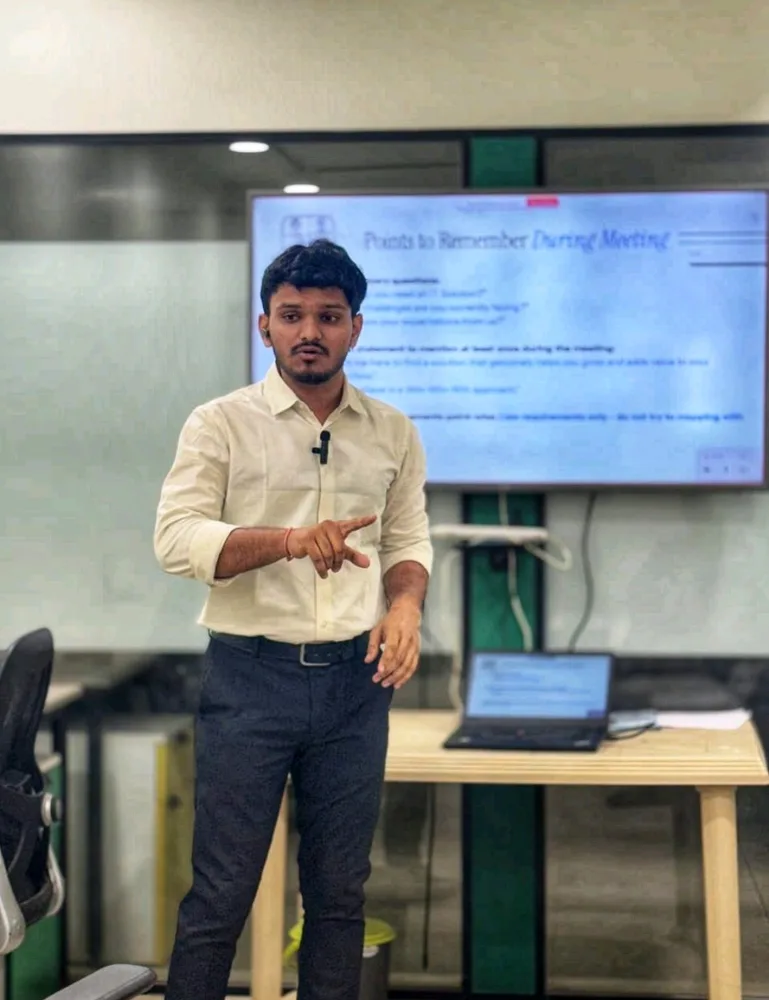 questions, not code
The intern who joined in December 2024 would have brought a folder tree.
Nineteen months later, I became Solution Architect at Satat. I owe that to the company, for making the move and taking me with it, and to the customers and teammates who answered my questions along the way.
ERP taught me that technology is only part of the job. The rest is understanding the business, finding the real problem, and getting it solved.
Tech didn't lose. It just stopped being the first question.
Footnotes
ERP stands for enterprise resource planning: business software that manages a company's day-to-day operations in one connected system. IBM's definition ↩
Frappe is a web framework for building database-driven apps. It powers ERPNext, an open-source ERP. Frappe docs ↩
Reported by Lindsay Clark in The Register on 13 November 2025, from Gartner's Symposium conference. The causes Gartner listed go well beyond process. ERP carnage continues as orgs jump in unprepared ↩
Panorama Consulting Group, The 2024 ERP Report, page 19, from 131 responses collected between August 2022 and December 2023. Panorama sells ERP consulting, so this is an expert's view, not a measured result. Read the report (PDF) ↩
Panorama Consulting Group, The 2026 ERP Report, page 16, from 170 responses collected between January 2025 and January 2026. Again, this is the firm's view from its own work. Read the report (PDF) ↩
Understanding DocTypes in the Frappe docs. ↩
Workspaces in the Frappe docs. ↩